
Add Pihu to your websiteअपनी वेबसाइट पर Pihu लगाएँ
One line of code. 2 minutes. Works on any website.एक लाइन कोड। 2 मिनट। हर वेबसाइट पर चलता है।
- 1 · Get your business idबिज़नेस id लें
- 2 · Copy your codeकोड कॉपी करें
- 3 · Paste on your siteवेबसाइट पर लगाएँ
- 4 · Teach Pihu your answersPihu को जवाब सिखाएँ
- 5 · See your enquiriesपूछताछ देखें
- 6 · All optionsसभी विकल्प
- ? · Problemsसमस्याएँ
👀What your visitors seeग्राहकों को क्या दिखेगा
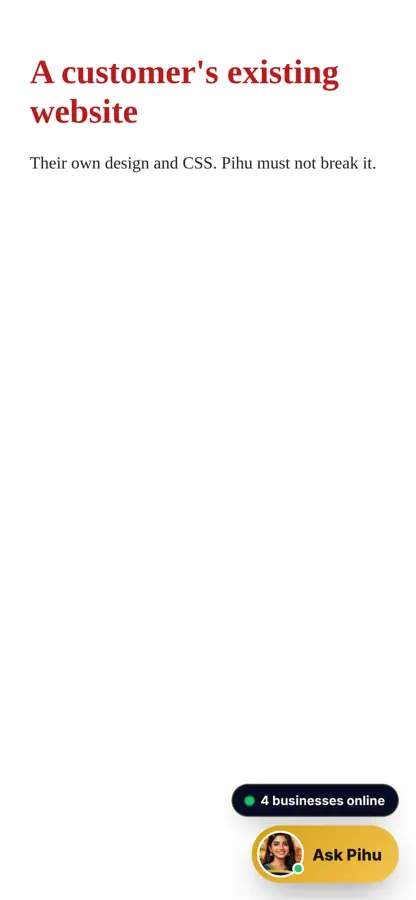
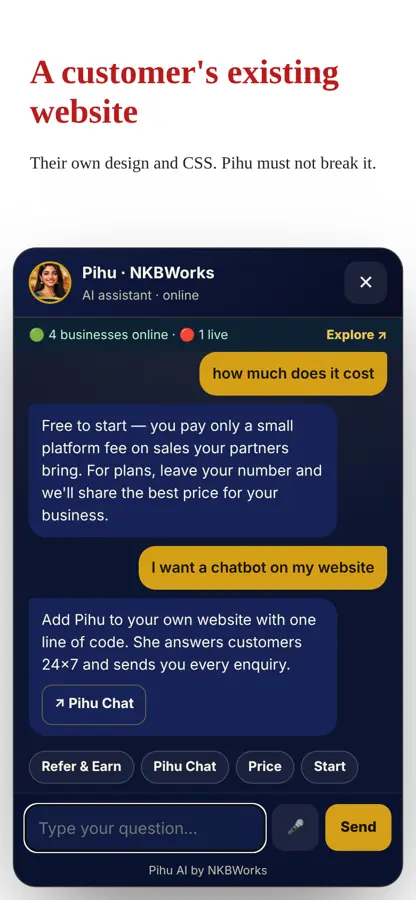
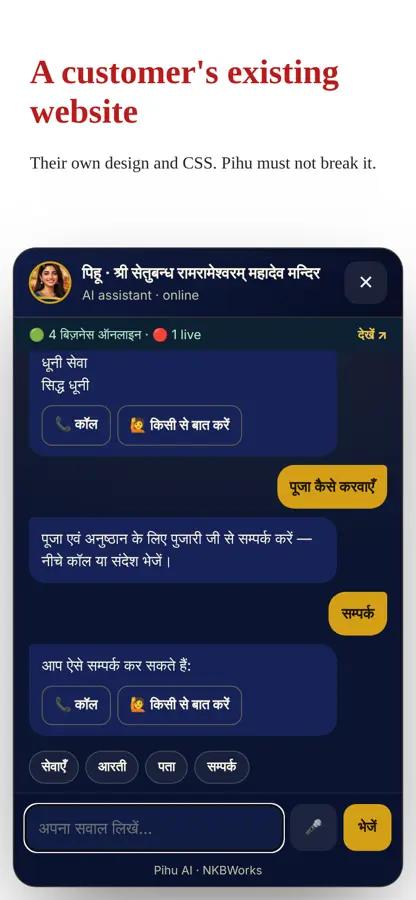
1Get your business idअपना बिज़नेस id लें
Sign up free at referral.nkbworks.com. We send your business id (for example pushkar-kund) by email and WhatsApp.
referral.nkbworks.com पर फ़्री साइन-अप करें। हम आपका बिज़नेस id (जैसे pushkar-kund) ईमेल और WhatsApp पर भेजते हैं।
2Copy your codeअपना कोड कॉपी करें
Open the code maker, type your id, choose Pihu's look, colour and language — then Copy. Or use this and change your-business-id:
कोड मेकर खोलें, अपना id लिखें, Pihu का रूप, रंग और भाषा चुनें — फिर Copy दबाएँ। या यह कोड लें और your-business-id बदलें:
<script src="https://pihu.nkbworks.com/chat.js" data-site="your-business-id" async></script>
Pihu's looks:Pihu के रूप:
 banaras
 agent
 little
3Paste it on your websiteवेबसाइट पर लगाएँ
Paste the code once — it shows on every page. Pick your website builder:
कोड एक बार लगाएँ — हर पेज पर दिखेगा। अपनी वेबसाइट चुनें:
WordPress
- Plugins › Add New › install WPCode (or "Insert Headers and Footers").Plugins › Add New › WPCode इंस्टॉल करें।
- Code Snippets › Header & Footer › paste in Footer › Save.Code Snippets › Header & Footer › Footer में पेस्ट › Save।
Wix
- Settings › Custom Code › + Add Custom Code.Settings › Custom Code › + Add Custom Code।
- Paste, choose "All pages", place in Body - end › Apply.पेस्ट करें, "All pages" चुनें, Body - end › Apply।
Shopify
- Online Store › Themes › … › Edit code › theme.liquid.Online Store › Themes › … › Edit code › theme.liquid।
- Paste just above
</body>› Save.</body>के ठीक ऊपर पेस्ट › Save।
Blogger
- Layout › Add a Gadget › HTML/JavaScript.Layout › Add a Gadget › HTML/JavaScript।
- Paste › Save.पेस्ट › Save।
Squarespace / Webflow / Google Sites
- Squarespace: Settings › Advanced › Code Injection › Footer. Webflow: Site settings › Custom code › Footer. Google Sites: Insert › Embed › Embed code.Squarespace: Settings › Advanced › Code Injection › Footer। Webflow: Site settings › Custom code › Footer। Google Sites: Insert › Embed।
Own HTML websiteअपनी HTML वेबसाइट
- Paste just above
</body>in every page (or your common footer file). Upload.हर पेज में</body>के ऊपर पेस्ट करें (या कॉमन फ़ुटर फ़ाइल में)। अपलोड करें।
4Teach Pihu your answersPihu को अपने जवाब सिखाएँ
- Send us your services, prices, timings, address, offer and your 10 most common questions — on WhatsApp or email.
- We add them to your business profile. Pihu uses them instantly — no code change on your site.
- Every question Pihu could not answer is saved, so we can add the answer next time.
- अपनी सेवाएँ, दाम, समय, पता, ऑफ़र और 10 सबसे आम सवाल WhatsApp या ईमेल पर भेजें।
- हम उन्हें आपकी प्रोफ़ाइल में जोड़ते हैं। Pihu तुरंत इस्तेमाल करती है — आपकी साइट पर कोई बदलाव नहीं।
- जिस सवाल का जवाब Pihu नहीं दे पाई, वह सेव होता है — अगली बार उसका जवाब जोड़ देते हैं।
5See your enquiriesअपनी पूछताछ देखें
When a visitor taps "Talk to a person", their name, number and question go to your NKBWorks leads (and dashboard). Call buttons and WhatsApp open directly.
जब ग्राहक "किसी से बात करें" दबाता है, उसका नाम, नंबर और सवाल आपकी NKBWorks लीड्स (और डैशबोर्ड) में आता है। कॉल और WhatsApp बटन सीधे खुलते हैं।
6All optionsसभी विकल्प
| Option | What it doesक्या करता है | Exampleउदाहरण |
|---|---|---|
data-site | Your business id (required)आपका बिज़नेस id (ज़रूरी) | pushkar-kund |
data-avatar | Pihu's look, or your photo linkPihu का रूप या आपकी फ़ोटो | banaras · agent · little · https://… |
data-name | Assistant nameसहायक का नाम | Pihu |
data-color | Button colourबटन का रंग | #d4a017 |
data-lang | Languageभाषा | en · hi |
data-position | Side of screenस्क्रीन की तरफ़ | right · left |
data-greeting | First messageपहला संदेश | Namaste! … |
data-voice | Mic and read-aloudमाइक और बोलकर पढ़ना | on · off |
data-badge | "Businesses online" badge"बिज़नेस ऑनलाइन" बैज | on · off |
Open Pihu from your own button:अपने बटन से Pihu खोलें:
<button onclick="Pihu.open()">Chat with us</button>
<button onclick="Pihu.ask('What are your timings?')">Timings</button>
?Problemsसमस्याएँ
- Button not showing: check the code is pasted in the footer of all pages and published. Clear your site cache.
- Wrong answers or business name: check
data-siteis your exact id. - Mic not working: the browser must allow the microphone; works in Chrome and Edge.
- Still stuck? Ask Pihu below or email nkbworksai@gmail.com.
- बटन नहीं दिख रहा: देखें कि कोड सभी पेज के फ़ुटर में है और पब्लिश हुआ है। साइट का cache साफ़ करें।
- गलत जवाब या नाम:
data-siteमें सही id है या नहीं देखें। - माइक नहीं चल रहा: ब्राउज़र में माइक की अनुमति दें; Chrome और Edge में चलता है।
- फिर भी दिक्कत? नीचे Pihu से पूछें या nkbworksai@gmail.com पर ईमेल करें।